> ## Documentation Index
> Fetch the complete documentation index at: https://docs.waypay.live/llms.txt
> Use this file to discover all available pages before exploring further.
# Deposit Flow
> Understanding how to collect payments using mobile wallet deposits
## Overview
The deposit flow allows you to collect payments directly from customer mobile wallets (JazzCash, Easypaisa, NayaPay, SadaPay). This is ideal for e-commerce checkouts, bill payments, and any scenario where you need to charge a customer's mobile wallet.
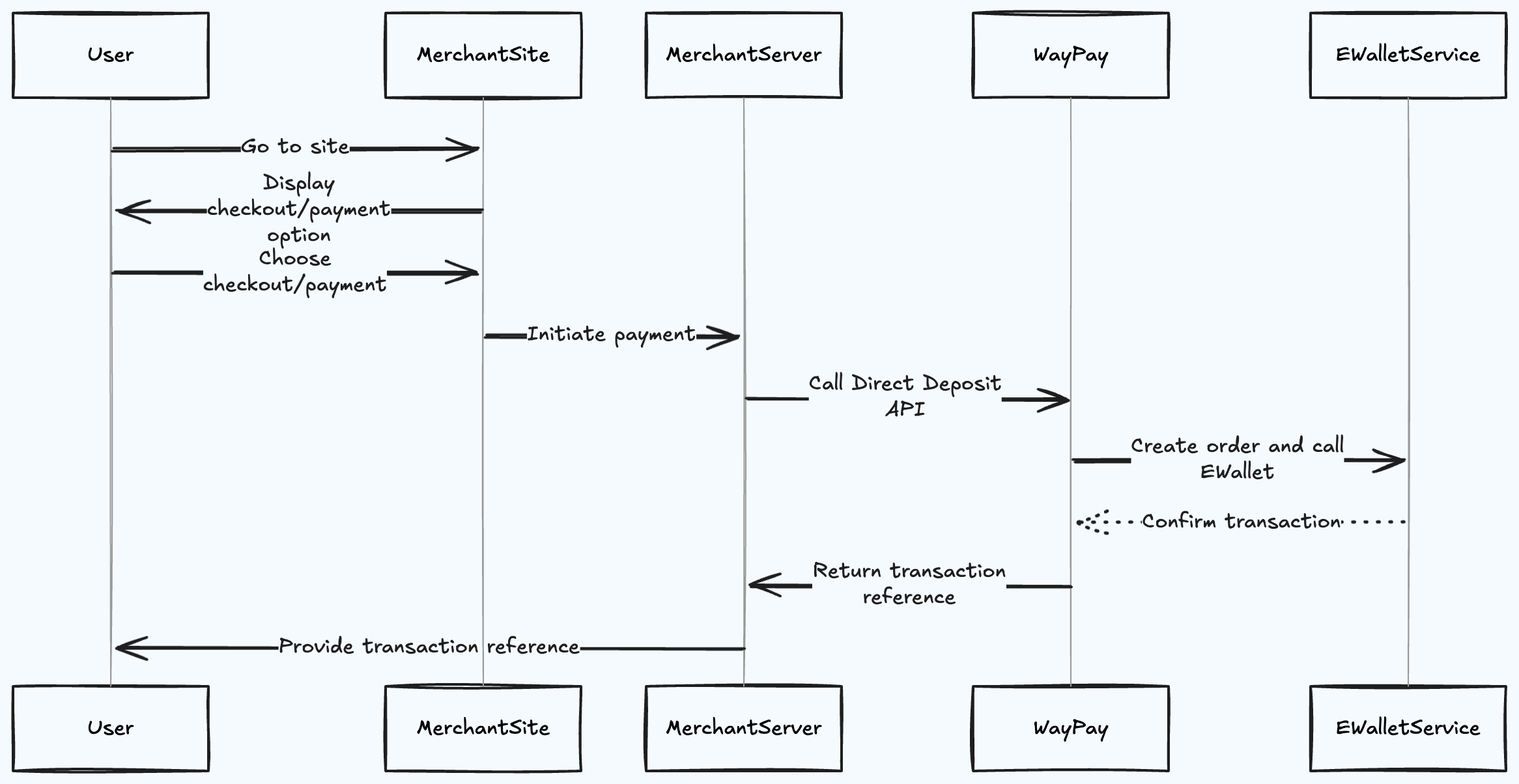
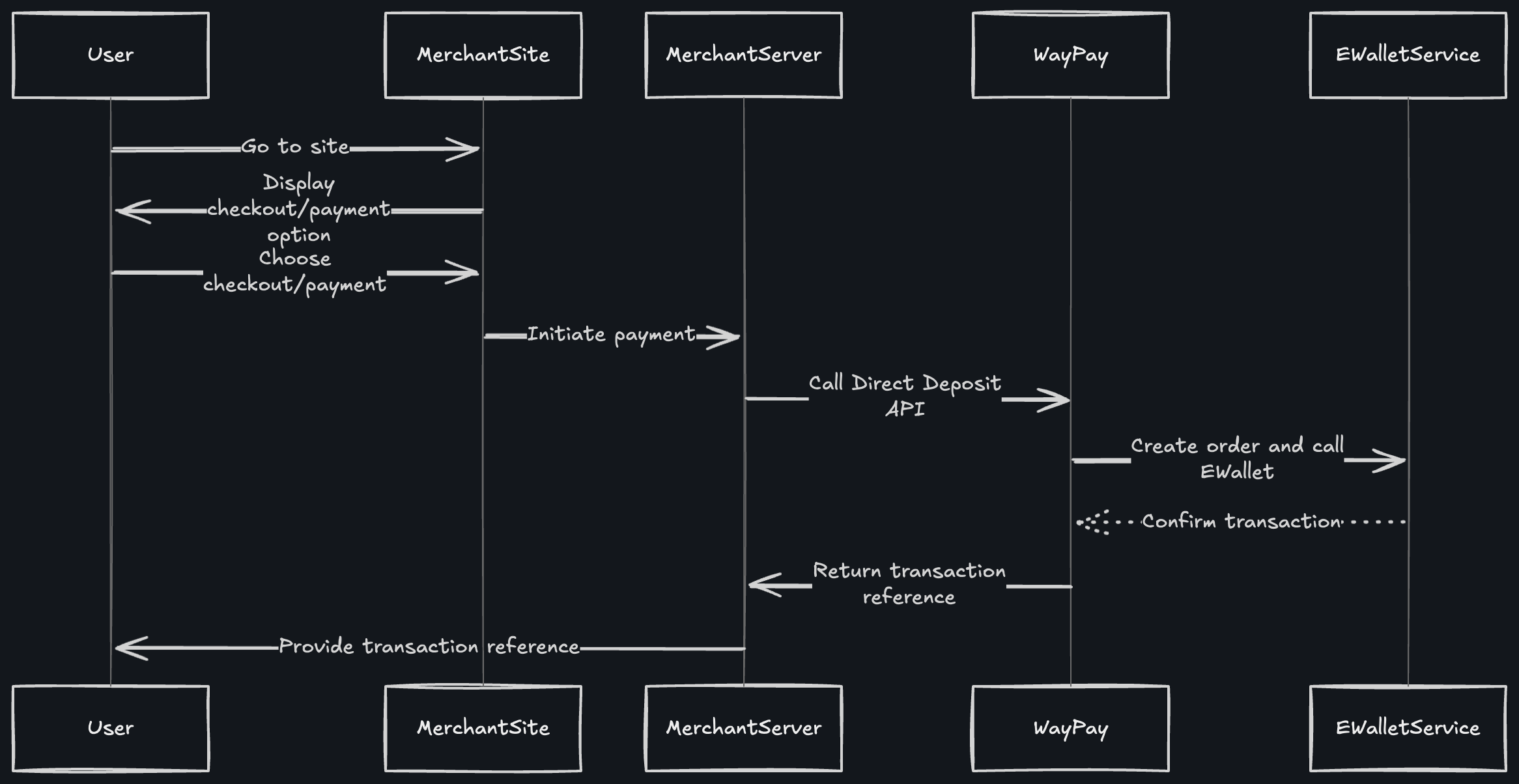
## Flow Diagram
 ## How It Works
### Step 1: User Initiates Payment
The customer visits your merchant site and proceeds to checkout, selecting their preferred mobile wallet payment option.
### Step 2: Merchant Server Calls Deposit API
Your backend server calls the Waypay `/Payment/deposit` endpoint with:
* Customer's mobile wallet number
* Payment amount
* Wallet provider (JazzCash, Easypaisa, etc.)
* Last 6 digits of customer's CNIC
* Customer and order details
```bash cURL theme={null}
curl --request POST \
--url https://gateway.dev.waypay.live/Gateway/v1/Payment/deposit \
--header 'SWICH-API-Key: pk_test_xxxxxxxx' \
--header 'Content-Type: application/json' \
--data '{
"mobileNumber": "03001234567",
"amount": 1500,
"walletProvider": 1,
"currency": "PKR",
"description": "Product Purchase",
"customerRef": {
"name": "Ali Ahmed",
"email": "ali@example.com",
"cnic": "4210112345678",
"phone": "03001234567"
},
"orderRef": {
"orderRef": "ORD123456"
},
"callbackUrl": "https://yoursite.com/payment/callback"
}'
```
```javascript Node.js theme={null}
const response = await fetch(
'https://gateway.dev.waypay.live/Gateway/v1/Payment/deposit',
{
method: 'POST',
headers: {
'SWICH-API-Key': process.env.WAYPAY_API_KEY,
'Content-Type': 'application/json'
},
body: JSON.stringify({
mobileNumber: '03001234567',
amount: 1500,
walletProvider: 1,
currency: 'PKR',
description: 'Product Purchase',
customerRef: {
name: 'Ali Ahmed',
email: 'ali@example.com',
cnic: '4210112345678',
phone: '03001234567'
},
orderRef: {
orderRef: 'ORD123456'
},
callbackUrl: 'https://yoursite.com/payment/callback'
})
}
);
const data = await response.json();
```
```python Python theme={null}
import requests
response = requests.post(
'https://gateway.dev.waypay.live/Gateway/v1/Payment/deposit',
headers={
'SWICH-API-Key': os.environ.get('WAYPAY_API_KEY'),
'Content-Type': 'application/json'
},
json={
'mobileNumber': '03001234567',
'amount': 1500,
'walletProvider': 1,
'currency': 'PKR',
'description': 'Product Purchase',
'customerRef': {
'name': 'Ali Ahmed',
'email': 'ali@example.com',
'cnic': '4210112345678',
'phone': '03001234567'
},
'orderRef': {
'orderRef': 'ORD123456'
},
'callbackUrl': 'https://yoursite.com/payment/callback'
}
)
```
### Step 3: Waypay Creates Order and Calls E-Wallet Service
WayPay processes your request and communicates with the mobile wallet provider (EWalletService) to initiate the charge.
### Step 4: E-Wallet Confirms Transaction
The mobile wallet service:
1. Sends an OTP to the customer's registered mobile number
2. Validates the customer's CNIC digits
3. Waits for customer confirmation
### Step 5: Transaction Reference Returned
WayPay returns a transaction reference to your merchant server:
```json theme={null}
{
"paymentIntentId": "770e8400-e29b-41d4-a716-446655440000",
"amount": 1500,
"currency": "PKR",
"merchantReference": "ORD123456",
"walletChargeInfo": {
"provider": "JazzCash",
"status": "Pending",
"transactionReference": "JC20251213123456",
"message": "OTP sent to customer",
"isSuccess": true,
"errorDetails": null
}
}
```
### Step 6: Merchant Provides Reference to User
Your site displays the transaction reference to the customer, allowing them to track the payment status.
## Fee Structure
**Important:** A transaction fee is deducted from each deposit before being added to your merchant balance.
### How Fees Work
When a customer makes a deposit:
1. **Customer pays:** Full amount (e.g., PKR 1,500)
2. **Transaction fee deducted:** Based on your merchant rate (e.g., PKR 45)
3. **Added to your balance:** Amount minus fee (e.g., PKR 1,455)
**Example Calculation:**
```
Deposit Amount: PKR 1,500
Transaction Fee: PKR 45 (3%)
Net Amount: PKR 1,455
─────────────────────────────
Amount Added to
Merchant Balance: PKR 1,455
```
### Fee Breakdown
The transaction fee includes:
* Platform processing fee
* Mobile wallet provider charges
* Payment gateway costs
Fee rates vary based on:
* Your merchant agreement
* Transaction volume
* Payment method used
Check your merchant dashboard for your specific fee structure.
## Wallet Provider Codes
Use these codes when specifying the `walletProvider` parameter:
| Provider | Code | Description |
| --------- | ---- | -------------------------------- |
| JazzCash | 1 | Pakistan's leading mobile wallet |
| Easypaisa | 2 | Popular mobile wallet service |
| NayaPay | 3 | Digital wallet platform |
| SadaPay | 4 | Modern digital wallet |
## Important Considerations
Always validate that the customer's mobile number matches the wallet account holder. The last 6 CNIC digits are used for verification.
### Customer Experience
1. **OTP Delivery**: Customer receives an OTP on their mobile wallet number
2. **Verification**: Customer enters OTP in their mobile wallet app
3. **Confirmation**: Transaction is completed once OTP is verified
4. **Timeout**: OTP typically expires in 5 minutes
### Best Practices
Ensure the mobile number is in the correct format (e.g., `03001234567` or `+923001234567`) before making the API call.
Set up webhook endpoints to receive real-time payment status updates instead of polling. Webhooks include fee information in the transaction details.
If the API call fails, implement exponential backoff retry logic with a maximum of 3 attempts.
Always store the `paymentIntentId` and `transactionReference` for reconciliation and customer support.
Show customers clear instructions about:
* Checking their mobile for OTP
* OTP expiration time
* How to retry if OTP expires
When displaying prices to customers, ensure your pricing accounts for transaction fees so you receive the expected net amount.
## Reconciliation
When reconciling deposits, use the Transaction API to get detailed fee information:
```json theme={null}
{
"id": "770e8400-e29b-41d4-a716-446655440000",
"amount": 1500.00,
"currency": "PKR",
"fee": 45.00,
"netAmount": 1455.00,
"txType": "Deposit",
"status": "Completed",
"createdAtUtc": "2025-12-13T10:30:00Z"
}
```
## Error Handling
Common errors and how to handle them:
| Error | Cause | Solution |
| -------------------------- | --------------------------- | -------------------------------- |
| Invalid mobile number | Number format incorrect | Validate format before API call |
| CNIC mismatch | Last 6 digits don't match | Ask customer to verify CNIC |
| Insufficient balance | Customer wallet balance low | Inform customer to top up wallet |
| Wallet service unavailable | Provider downtime | Retry later or offer alternative |
## Webhook Events
You'll receive webhook notifications for these events:
* `deposit.pending` - OTP sent to customer
* `deposit.completed` - Payment successful (includes fee and net amount)
* `deposit.failed` - Payment failed or expired
* `deposit.expired` - OTP expired without completion
## Next Steps
View complete API documentation
Configure webhook notifications
Understand transaction fees
Test deposit flow in sandbox
## How It Works
### Step 1: User Initiates Payment
The customer visits your merchant site and proceeds to checkout, selecting their preferred mobile wallet payment option.
### Step 2: Merchant Server Calls Deposit API
Your backend server calls the Waypay `/Payment/deposit` endpoint with:
* Customer's mobile wallet number
* Payment amount
* Wallet provider (JazzCash, Easypaisa, etc.)
* Last 6 digits of customer's CNIC
* Customer and order details
```bash cURL theme={null}
curl --request POST \
--url https://gateway.dev.waypay.live/Gateway/v1/Payment/deposit \
--header 'SWICH-API-Key: pk_test_xxxxxxxx' \
--header 'Content-Type: application/json' \
--data '{
"mobileNumber": "03001234567",
"amount": 1500,
"walletProvider": 1,
"currency": "PKR",
"description": "Product Purchase",
"customerRef": {
"name": "Ali Ahmed",
"email": "ali@example.com",
"cnic": "4210112345678",
"phone": "03001234567"
},
"orderRef": {
"orderRef": "ORD123456"
},
"callbackUrl": "https://yoursite.com/payment/callback"
}'
```
```javascript Node.js theme={null}
const response = await fetch(
'https://gateway.dev.waypay.live/Gateway/v1/Payment/deposit',
{
method: 'POST',
headers: {
'SWICH-API-Key': process.env.WAYPAY_API_KEY,
'Content-Type': 'application/json'
},
body: JSON.stringify({
mobileNumber: '03001234567',
amount: 1500,
walletProvider: 1,
currency: 'PKR',
description: 'Product Purchase',
customerRef: {
name: 'Ali Ahmed',
email: 'ali@example.com',
cnic: '4210112345678',
phone: '03001234567'
},
orderRef: {
orderRef: 'ORD123456'
},
callbackUrl: 'https://yoursite.com/payment/callback'
})
}
);
const data = await response.json();
```
```python Python theme={null}
import requests
response = requests.post(
'https://gateway.dev.waypay.live/Gateway/v1/Payment/deposit',
headers={
'SWICH-API-Key': os.environ.get('WAYPAY_API_KEY'),
'Content-Type': 'application/json'
},
json={
'mobileNumber': '03001234567',
'amount': 1500,
'walletProvider': 1,
'currency': 'PKR',
'description': 'Product Purchase',
'customerRef': {
'name': 'Ali Ahmed',
'email': 'ali@example.com',
'cnic': '4210112345678',
'phone': '03001234567'
},
'orderRef': {
'orderRef': 'ORD123456'
},
'callbackUrl': 'https://yoursite.com/payment/callback'
}
)
```
### Step 3: Waypay Creates Order and Calls E-Wallet Service
WayPay processes your request and communicates with the mobile wallet provider (EWalletService) to initiate the charge.
### Step 4: E-Wallet Confirms Transaction
The mobile wallet service:
1. Sends an OTP to the customer's registered mobile number
2. Validates the customer's CNIC digits
3. Waits for customer confirmation
### Step 5: Transaction Reference Returned
WayPay returns a transaction reference to your merchant server:
```json theme={null}
{
"paymentIntentId": "770e8400-e29b-41d4-a716-446655440000",
"amount": 1500,
"currency": "PKR",
"merchantReference": "ORD123456",
"walletChargeInfo": {
"provider": "JazzCash",
"status": "Pending",
"transactionReference": "JC20251213123456",
"message": "OTP sent to customer",
"isSuccess": true,
"errorDetails": null
}
}
```
### Step 6: Merchant Provides Reference to User
Your site displays the transaction reference to the customer, allowing them to track the payment status.
## Fee Structure
**Important:** A transaction fee is deducted from each deposit before being added to your merchant balance.
### How Fees Work
When a customer makes a deposit:
1. **Customer pays:** Full amount (e.g., PKR 1,500)
2. **Transaction fee deducted:** Based on your merchant rate (e.g., PKR 45)
3. **Added to your balance:** Amount minus fee (e.g., PKR 1,455)
**Example Calculation:**
```
Deposit Amount: PKR 1,500
Transaction Fee: PKR 45 (3%)
Net Amount: PKR 1,455
─────────────────────────────
Amount Added to
Merchant Balance: PKR 1,455
```
### Fee Breakdown
The transaction fee includes:
* Platform processing fee
* Mobile wallet provider charges
* Payment gateway costs
Fee rates vary based on:
* Your merchant agreement
* Transaction volume
* Payment method used
Check your merchant dashboard for your specific fee structure.
## Wallet Provider Codes
Use these codes when specifying the `walletProvider` parameter:
| Provider | Code | Description |
| --------- | ---- | -------------------------------- |
| JazzCash | 1 | Pakistan's leading mobile wallet |
| Easypaisa | 2 | Popular mobile wallet service |
| NayaPay | 3 | Digital wallet platform |
| SadaPay | 4 | Modern digital wallet |
## Important Considerations
Always validate that the customer's mobile number matches the wallet account holder. The last 6 CNIC digits are used for verification.
### Customer Experience
1. **OTP Delivery**: Customer receives an OTP on their mobile wallet number
2. **Verification**: Customer enters OTP in their mobile wallet app
3. **Confirmation**: Transaction is completed once OTP is verified
4. **Timeout**: OTP typically expires in 5 minutes
### Best Practices
Ensure the mobile number is in the correct format (e.g., `03001234567` or `+923001234567`) before making the API call.
Set up webhook endpoints to receive real-time payment status updates instead of polling. Webhooks include fee information in the transaction details.
If the API call fails, implement exponential backoff retry logic with a maximum of 3 attempts.
Always store the `paymentIntentId` and `transactionReference` for reconciliation and customer support.
Show customers clear instructions about:
* Checking their mobile for OTP
* OTP expiration time
* How to retry if OTP expires
When displaying prices to customers, ensure your pricing accounts for transaction fees so you receive the expected net amount.
## Reconciliation
When reconciling deposits, use the Transaction API to get detailed fee information:
```json theme={null}
{
"id": "770e8400-e29b-41d4-a716-446655440000",
"amount": 1500.00,
"currency": "PKR",
"fee": 45.00,
"netAmount": 1455.00,
"txType": "Deposit",
"status": "Completed",
"createdAtUtc": "2025-12-13T10:30:00Z"
}
```
## Error Handling
Common errors and how to handle them:
| Error | Cause | Solution |
| -------------------------- | --------------------------- | -------------------------------- |
| Invalid mobile number | Number format incorrect | Validate format before API call |
| CNIC mismatch | Last 6 digits don't match | Ask customer to verify CNIC |
| Insufficient balance | Customer wallet balance low | Inform customer to top up wallet |
| Wallet service unavailable | Provider downtime | Retry later or offer alternative |
## Webhook Events
You'll receive webhook notifications for these events:
* `deposit.pending` - OTP sent to customer
* `deposit.completed` - Payment successful (includes fee and net amount)
* `deposit.failed` - Payment failed or expired
* `deposit.expired` - OTP expired without completion
## Next Steps
View complete API documentation
Configure webhook notifications
Understand transaction fees
Test deposit flow in sandbox