> ## Documentation Index
> Fetch the complete documentation index at: https://docs.waypay.live/llms.txt
> Use this file to discover all available pages before exploring further.
# Withdrawal Flow
> Understanding how to process payouts to customer bank accounts
## Overview
The withdrawal flow allows you to send funds from your merchant wallet to customer bank accounts. This is ideal for disbursements, refunds, commission payments, vendor payouts, and any scenario where you need to transfer money to customers or partners.
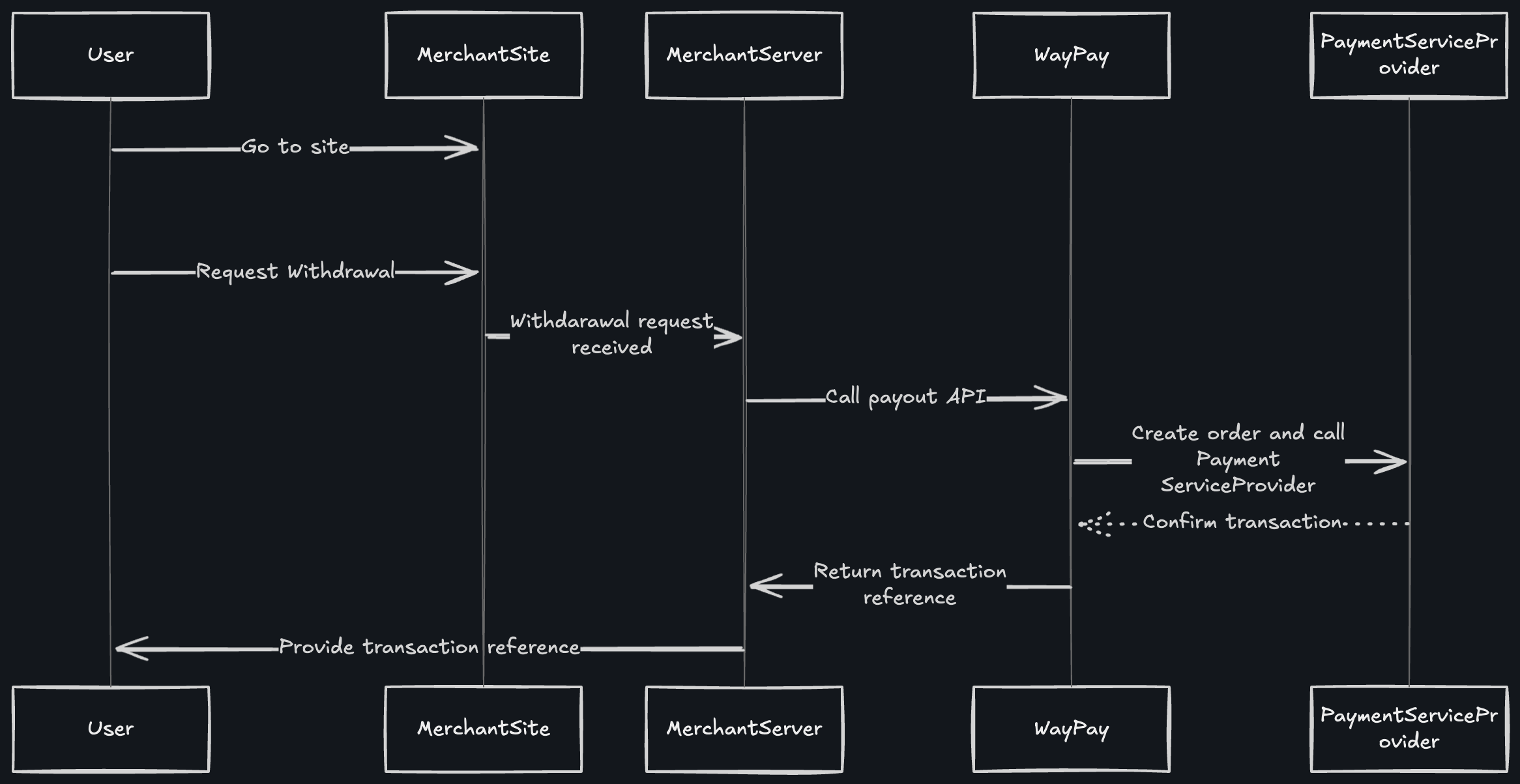
## Flow Diagram

 ## How It Works
### Step 1: User Initiates Withdrawal Request
The customer visits your merchant site and requests a withdrawal (e.g., refund request, payout request, commission withdrawal).
### Step 2: Merchant Server Receives Request
Your merchant site captures the withdrawal request from the user and sends it to your backend server for processing.
### Step 3: Merchant Server Calls Payout API
Your backend server calls the Waypay `/Payment/withdraw` endpoint with:
* Withdrawal amount
* Customer's bank account details (IBAN or account number)
* Customer's bank name
* Customer's full name and CNIC
* Withdrawal description and reference
```bash cURL theme={null}
curl --request POST \
--url https://gateway.dev.waypay.live/Gateway/v1/Payment/withdraw \
--header 'SWICH-API-Key: pk_test_xxxxxxxx' \
--header 'Content-Type: application/json' \
--data '{
"amount": 5000,
"currency": "PKR",
"description": "Refund Payment",
"autoProcessPayout": true,
"callbackUrl": "https://yoursite.com/withdrawal/callback",
"customerRef": {
"name": "Ahmed Ali",
"email": "ahmed@example.com",
"cnic": "4210112345678",
"phone": "03001234567",
"bankAccountNumber": "PK36SCBL0000001123456702",
"bankName": "Standard Chartered Bank",
"accountTitle": "Ahmed Ali"
},
"orderRef": {
"orderRef": "WD123456"
}
}'
```
```javascript Node.js theme={null}
const response = await fetch(
'https://gateway.dev.waypay.live/Gateway/v1/Payment/withdraw',
{
method: 'POST',
headers: {
'SWICH-API-Key': process.env.WAYPAY_API_KEY,
'Content-Type': 'application/json'
},
body: JSON.stringify({
amount: 5000,
currency: 'PKR',
description: 'Refund Payment',
autoProcessPayout: true,
callbackUrl: 'https://yoursite.com/withdrawal/callback',
customerRef: {
name: 'Ahmed Ali',
email: 'ahmed@example.com',
cnic: '4210112345678',
phone: '03001234567',
bankAccountNumber: 'PK36SCBL0000001123456702',
bankName: 'Standard Chartered Bank',
accountTitle: 'Ahmed Ali'
},
orderRef: {
orderRef: 'WD123456'
}
})
}
);
const data = await response.json();
```
```python Python theme={null}
import requests
import os
response = requests.post(
'https://gateway.dev.waypay.live/Gateway/v1/Payment/withdraw',
headers={
'SWICH-API-Key': os.environ.get('WAYPAY_API_KEY'),
'Content-Type': 'application/json'
},
json={
'amount': 5000,
'currency': 'PKR',
'description': 'Refund Payment',
'autoProcessPayout': True,
'callbackUrl': 'https://yoursite.com/withdrawal/callback',
'customerRef': {
'name': 'Ahmed Ali',
'email': 'ahmed@example.com',
'cnic': '4210112345678',
'phone': '03001234567',
'bankAccountNumber': 'PK36SCBL0000001123456702',
'bankName': 'Standard Chartered Bank',
'accountTitle': 'Ahmed Ali'
},
'orderRef': {
'orderRef': 'WD123456'
}
}
)
```
### Step 4: WayPay Creates Order and Calls Payment Service Provider
WayPay processes your withdrawal request and communicates with the Payment Service Provider (bank) to initiate the fund transfer.
### Step 5: Payment Service Provider Confirms Transaction
The Payment Service Provider:
1. Validates the bank account details
2. Checks account holder name against CNIC
3. Initiates the bank transfer
4. Returns confirmation (indicated by dotted line showing async confirmation)
### Step 6: Transaction Reference Returned
WayPay returns a transaction reference to your merchant server:
```json theme={null}
{
"paymentIntentId": "880e8400-e29b-41d4-a716-446655440000",
"amount": 5000,
"currency": "PKR",
"merchantReference": "WD123456",
"payoutInfo": {
"status": "Processing",
"transactionReference": "WD20251213123456",
"message": "Payout initiated successfully",
"isSuccess": true,
"errorDetails": null,
"estimatedCompletionTime": "2025-12-14T10:00:00Z",
"customerBankName": "Standard Chartered Bank",
"customerAccountNumber": "PK36SCBL0000001123456702"
}
}
```
### Step 7: Merchant Provides Reference to User
Your site displays the transaction reference to the customer, allowing them to track the withdrawal status.
## Fee Structure
**Important:** A transaction fee is added to the withdrawal amount and deducted from your merchant balance.
### How Fees Work
When processing a withdrawal:
1. **Withdrawal amount:** Amount to send to customer (e.g., PKR 5,000)
2. **Transaction fee added:** Based on your merchant rate (e.g., PKR 150)
3. **Deducted from balance:** Amount plus fee (e.g., PKR 5,150)
4. **Customer receives:** Full withdrawal amount (e.g., PKR 5,000)
**Example Calculation:**
```
Withdrawal Amount: PKR 5,000
Transaction Fee: PKR 150 (3%)
Total Deduction: PKR 5,150
─────────────────────────────────
Amount Deducted from
Merchant Balance: PKR 5,150
Customer Receives: PKR 5,000
```
### Fee Breakdown
The transaction fee covers:
* Bank transfer charges
* Platform processing fee
* Payment service provider costs
* Interbank transfer fees
Fee rates vary based on:
* Your merchant agreement
* Transaction volume
* Destination bank
* Transfer type (instant/standard)
Check your merchant dashboard for your specific fee structure.
### Balance Check Before Withdrawal
Always ensure you have sufficient balance to cover both the withdrawal amount and the fee:
```javascript theme={null}
// Check balance before initiating withdrawal
const balanceResponse = await fetch(
'https://gateway.dev.waypay.live/Gateway/v1/Account/query-balance',
{
method: 'POST',
headers: {
'SWICH-API-Key': process.env.WAYPAY_API_KEY
}
}
);
const balance = await balanceResponse.json();
const withdrawalAmount = 5000;
const estimatedFee = withdrawalAmount * 0.03; // 3% example rate
const totalRequired = withdrawalAmount + estimatedFee;
if (balance.availableBalance >= totalRequired) {
// Proceed with withdrawal
} else {
// Insufficient balance
console.log('Insufficient balance. Need:', totalRequired, 'Have:', balance.availableBalance);
}
```
## Processing Modes
### Auto Process Payout
When `autoProcessPayout` is set to `true`:
* ✅ Withdrawal is processed immediately
* ✅ No manual approval required
* ✅ Ideal for automated systems
* ✅ Best for trusted transactions
* ⚠️ Ensure sufficient balance including fees
### Manual Approval
When `autoProcessPayout` is set to `false` (default):
* ⏳ Withdrawal requires manual approval
* 🔒 Additional security layer
* 👥 Suitable for high-value transactions
* 📊 Allows review before processing
## Processing Time
Withdrawal processing times vary by bank and amount:
| Processing Type | Timeframe | Use Case |
| --------------- | ----------- | ----------------------------------------------- |
| **Instant** | Real-time | Some banks support instant transfers |
| **Same Day** | 2-4 hours | Most local banks during business hours |
| **Next Day** | 24 hours | High-value transactions or after business hours |
| **2-3 Days** | 48-72 hours | International transfers or special cases |
The `estimatedCompletionTime` field in the response provides the expected completion timestamp based on the specific transaction.
## Bank Account Validation
### Supported Account Formats
* **IBAN**: `PK36SCBL0000001123456702`
* **Account Number**: `0123456789012345`
### Validation Requirements
Must match the name associated with the bank account. Minor variations are acceptable (e.g., "Muhammad Ali" vs "M Ali").
The CNIC provided must match the account holder's CNIC registered with the bank.
Must be the exact name of the bank. Use standard bank names (e.g., "Habib Bank Limited", "MCB Bank", "Standard Chartered Bank").
The destination bank account must be active and able to receive funds.
## Best Practices
Always verify bank account details before processing withdrawals to prevent failed transactions
Ensure sufficient balance for withdrawal amount PLUS transaction fees before initiating
Configure webhooks to receive real-time updates on withdrawal status changes
Save `paymentIntentId` and `transactionReference` for reconciliation and support
## Reconciliation
When reconciling withdrawals, use the Transaction API to get detailed fee information:
```json theme={null}
{
"id": "880e8400-e29b-41d4-a716-446655440000",
"amount": 5000.00,
"currency": "PKR",
"fee": 150.00,
"netAmount": 5150.00,
"txType": "Withdrawal",
"status": "Completed",
"createdAtUtc": "2025-12-13T10:30:00Z"
}
```
**Note:** For withdrawals, `netAmount` represents the total deducted from your balance (withdrawal amount + fee).
## Error Handling
Common errors and solutions:
| Error | Cause | Solution |
| ----------------------- | ------------------------------------------------ | ----------------------------------------- |
| Invalid account number | Incorrect format or non-existent | Validate format and verify with customer |
| Insufficient balance | Merchant wallet balance too low (including fees) | Add funds to wallet before retry |
| Account holder mismatch | Name doesn't match bank records | Verify exact name spelling with customer |
| Bank account inactive | Account closed or frozen | Request alternative account from customer |
| CNIC mismatch | CNIC doesn't match account | Verify CNIC number with customer |
## Webhook Events
You'll receive webhook notifications for these events:
* `withdrawal.created` - Withdrawal order created
* `withdrawal.processing` - Bank transfer initiated
* `withdrawal.completed` - Funds successfully transferred (includes fee details)
* `withdrawal.failed` - Transfer failed (with reason)
* `withdrawal.cancelled` - Withdrawal cancelled
## Security Considerations
**Important Security Measures**
* Always validate withdrawal requests on your server
* Implement daily/monthly withdrawal limits
* Use `autoProcessPayout: false` for amounts above your threshold
* Maintain audit logs of all withdrawal requests
* Verify customer identity for high-value withdrawals
* Account for fees in your withdrawal limits
## Compliance Requirements
For Pakistani banks, ensure:
* ✅ Valid CNIC provided (13 digits without dashes)
* ✅ Account holder name matches CNIC records
* ✅ Bank account is registered in Pakistan
* ✅ Transaction purpose is documented
* ✅ AML/KYC requirements met for large transactions
## Next Steps
View complete API documentation
Configure webhook notifications
Query your wallet balance
Understand transaction fees
## How It Works
### Step 1: User Initiates Withdrawal Request
The customer visits your merchant site and requests a withdrawal (e.g., refund request, payout request, commission withdrawal).
### Step 2: Merchant Server Receives Request
Your merchant site captures the withdrawal request from the user and sends it to your backend server for processing.
### Step 3: Merchant Server Calls Payout API
Your backend server calls the Waypay `/Payment/withdraw` endpoint with:
* Withdrawal amount
* Customer's bank account details (IBAN or account number)
* Customer's bank name
* Customer's full name and CNIC
* Withdrawal description and reference
```bash cURL theme={null}
curl --request POST \
--url https://gateway.dev.waypay.live/Gateway/v1/Payment/withdraw \
--header 'SWICH-API-Key: pk_test_xxxxxxxx' \
--header 'Content-Type: application/json' \
--data '{
"amount": 5000,
"currency": "PKR",
"description": "Refund Payment",
"autoProcessPayout": true,
"callbackUrl": "https://yoursite.com/withdrawal/callback",
"customerRef": {
"name": "Ahmed Ali",
"email": "ahmed@example.com",
"cnic": "4210112345678",
"phone": "03001234567",
"bankAccountNumber": "PK36SCBL0000001123456702",
"bankName": "Standard Chartered Bank",
"accountTitle": "Ahmed Ali"
},
"orderRef": {
"orderRef": "WD123456"
}
}'
```
```javascript Node.js theme={null}
const response = await fetch(
'https://gateway.dev.waypay.live/Gateway/v1/Payment/withdraw',
{
method: 'POST',
headers: {
'SWICH-API-Key': process.env.WAYPAY_API_KEY,
'Content-Type': 'application/json'
},
body: JSON.stringify({
amount: 5000,
currency: 'PKR',
description: 'Refund Payment',
autoProcessPayout: true,
callbackUrl: 'https://yoursite.com/withdrawal/callback',
customerRef: {
name: 'Ahmed Ali',
email: 'ahmed@example.com',
cnic: '4210112345678',
phone: '03001234567',
bankAccountNumber: 'PK36SCBL0000001123456702',
bankName: 'Standard Chartered Bank',
accountTitle: 'Ahmed Ali'
},
orderRef: {
orderRef: 'WD123456'
}
})
}
);
const data = await response.json();
```
```python Python theme={null}
import requests
import os
response = requests.post(
'https://gateway.dev.waypay.live/Gateway/v1/Payment/withdraw',
headers={
'SWICH-API-Key': os.environ.get('WAYPAY_API_KEY'),
'Content-Type': 'application/json'
},
json={
'amount': 5000,
'currency': 'PKR',
'description': 'Refund Payment',
'autoProcessPayout': True,
'callbackUrl': 'https://yoursite.com/withdrawal/callback',
'customerRef': {
'name': 'Ahmed Ali',
'email': 'ahmed@example.com',
'cnic': '4210112345678',
'phone': '03001234567',
'bankAccountNumber': 'PK36SCBL0000001123456702',
'bankName': 'Standard Chartered Bank',
'accountTitle': 'Ahmed Ali'
},
'orderRef': {
'orderRef': 'WD123456'
}
}
)
```
### Step 4: WayPay Creates Order and Calls Payment Service Provider
WayPay processes your withdrawal request and communicates with the Payment Service Provider (bank) to initiate the fund transfer.
### Step 5: Payment Service Provider Confirms Transaction
The Payment Service Provider:
1. Validates the bank account details
2. Checks account holder name against CNIC
3. Initiates the bank transfer
4. Returns confirmation (indicated by dotted line showing async confirmation)
### Step 6: Transaction Reference Returned
WayPay returns a transaction reference to your merchant server:
```json theme={null}
{
"paymentIntentId": "880e8400-e29b-41d4-a716-446655440000",
"amount": 5000,
"currency": "PKR",
"merchantReference": "WD123456",
"payoutInfo": {
"status": "Processing",
"transactionReference": "WD20251213123456",
"message": "Payout initiated successfully",
"isSuccess": true,
"errorDetails": null,
"estimatedCompletionTime": "2025-12-14T10:00:00Z",
"customerBankName": "Standard Chartered Bank",
"customerAccountNumber": "PK36SCBL0000001123456702"
}
}
```
### Step 7: Merchant Provides Reference to User
Your site displays the transaction reference to the customer, allowing them to track the withdrawal status.
## Fee Structure
**Important:** A transaction fee is added to the withdrawal amount and deducted from your merchant balance.
### How Fees Work
When processing a withdrawal:
1. **Withdrawal amount:** Amount to send to customer (e.g., PKR 5,000)
2. **Transaction fee added:** Based on your merchant rate (e.g., PKR 150)
3. **Deducted from balance:** Amount plus fee (e.g., PKR 5,150)
4. **Customer receives:** Full withdrawal amount (e.g., PKR 5,000)
**Example Calculation:**
```
Withdrawal Amount: PKR 5,000
Transaction Fee: PKR 150 (3%)
Total Deduction: PKR 5,150
─────────────────────────────────
Amount Deducted from
Merchant Balance: PKR 5,150
Customer Receives: PKR 5,000
```
### Fee Breakdown
The transaction fee covers:
* Bank transfer charges
* Platform processing fee
* Payment service provider costs
* Interbank transfer fees
Fee rates vary based on:
* Your merchant agreement
* Transaction volume
* Destination bank
* Transfer type (instant/standard)
Check your merchant dashboard for your specific fee structure.
### Balance Check Before Withdrawal
Always ensure you have sufficient balance to cover both the withdrawal amount and the fee:
```javascript theme={null}
// Check balance before initiating withdrawal
const balanceResponse = await fetch(
'https://gateway.dev.waypay.live/Gateway/v1/Account/query-balance',
{
method: 'POST',
headers: {
'SWICH-API-Key': process.env.WAYPAY_API_KEY
}
}
);
const balance = await balanceResponse.json();
const withdrawalAmount = 5000;
const estimatedFee = withdrawalAmount * 0.03; // 3% example rate
const totalRequired = withdrawalAmount + estimatedFee;
if (balance.availableBalance >= totalRequired) {
// Proceed with withdrawal
} else {
// Insufficient balance
console.log('Insufficient balance. Need:', totalRequired, 'Have:', balance.availableBalance);
}
```
## Processing Modes
### Auto Process Payout
When `autoProcessPayout` is set to `true`:
* ✅ Withdrawal is processed immediately
* ✅ No manual approval required
* ✅ Ideal for automated systems
* ✅ Best for trusted transactions
* ⚠️ Ensure sufficient balance including fees
### Manual Approval
When `autoProcessPayout` is set to `false` (default):
* ⏳ Withdrawal requires manual approval
* 🔒 Additional security layer
* 👥 Suitable for high-value transactions
* 📊 Allows review before processing
## Processing Time
Withdrawal processing times vary by bank and amount:
| Processing Type | Timeframe | Use Case |
| --------------- | ----------- | ----------------------------------------------- |
| **Instant** | Real-time | Some banks support instant transfers |
| **Same Day** | 2-4 hours | Most local banks during business hours |
| **Next Day** | 24 hours | High-value transactions or after business hours |
| **2-3 Days** | 48-72 hours | International transfers or special cases |
The `estimatedCompletionTime` field in the response provides the expected completion timestamp based on the specific transaction.
## Bank Account Validation
### Supported Account Formats
* **IBAN**: `PK36SCBL0000001123456702`
* **Account Number**: `0123456789012345`
### Validation Requirements
Must match the name associated with the bank account. Minor variations are acceptable (e.g., "Muhammad Ali" vs "M Ali").
The CNIC provided must match the account holder's CNIC registered with the bank.
Must be the exact name of the bank. Use standard bank names (e.g., "Habib Bank Limited", "MCB Bank", "Standard Chartered Bank").
The destination bank account must be active and able to receive funds.
## Best Practices
Always verify bank account details before processing withdrawals to prevent failed transactions
Ensure sufficient balance for withdrawal amount PLUS transaction fees before initiating
Configure webhooks to receive real-time updates on withdrawal status changes
Save `paymentIntentId` and `transactionReference` for reconciliation and support
## Reconciliation
When reconciling withdrawals, use the Transaction API to get detailed fee information:
```json theme={null}
{
"id": "880e8400-e29b-41d4-a716-446655440000",
"amount": 5000.00,
"currency": "PKR",
"fee": 150.00,
"netAmount": 5150.00,
"txType": "Withdrawal",
"status": "Completed",
"createdAtUtc": "2025-12-13T10:30:00Z"
}
```
**Note:** For withdrawals, `netAmount` represents the total deducted from your balance (withdrawal amount + fee).
## Error Handling
Common errors and solutions:
| Error | Cause | Solution |
| ----------------------- | ------------------------------------------------ | ----------------------------------------- |
| Invalid account number | Incorrect format or non-existent | Validate format and verify with customer |
| Insufficient balance | Merchant wallet balance too low (including fees) | Add funds to wallet before retry |
| Account holder mismatch | Name doesn't match bank records | Verify exact name spelling with customer |
| Bank account inactive | Account closed or frozen | Request alternative account from customer |
| CNIC mismatch | CNIC doesn't match account | Verify CNIC number with customer |
## Webhook Events
You'll receive webhook notifications for these events:
* `withdrawal.created` - Withdrawal order created
* `withdrawal.processing` - Bank transfer initiated
* `withdrawal.completed` - Funds successfully transferred (includes fee details)
* `withdrawal.failed` - Transfer failed (with reason)
* `withdrawal.cancelled` - Withdrawal cancelled
## Security Considerations
**Important Security Measures**
* Always validate withdrawal requests on your server
* Implement daily/monthly withdrawal limits
* Use `autoProcessPayout: false` for amounts above your threshold
* Maintain audit logs of all withdrawal requests
* Verify customer identity for high-value withdrawals
* Account for fees in your withdrawal limits
## Compliance Requirements
For Pakistani banks, ensure:
* ✅ Valid CNIC provided (13 digits without dashes)
* ✅ Account holder name matches CNIC records
* ✅ Bank account is registered in Pakistan
* ✅ Transaction purpose is documented
* ✅ AML/KYC requirements met for large transactions
## Next Steps
View complete API documentation
Configure webhook notifications
Query your wallet balance
Understand transaction fees