

Overview
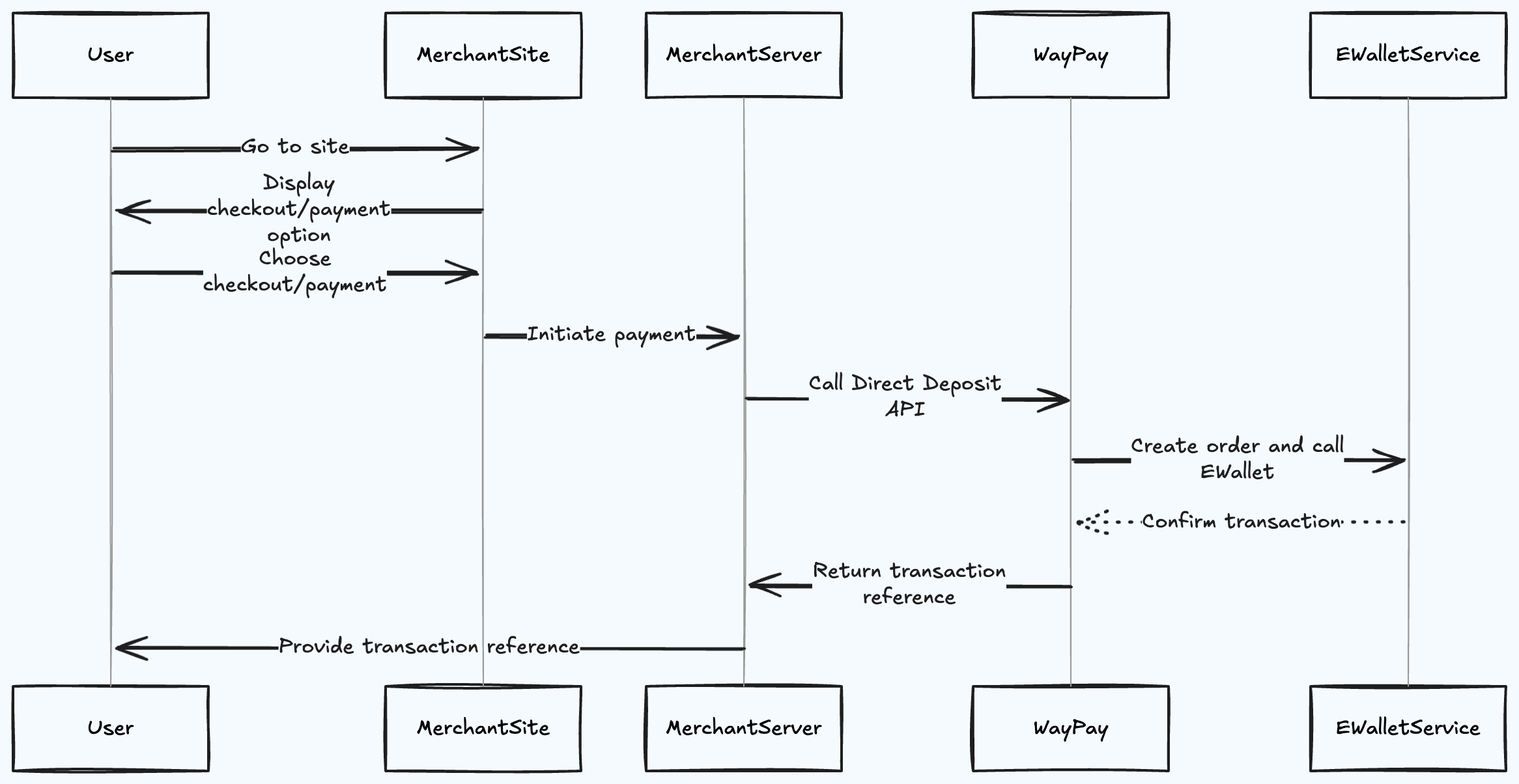
The deposit flow allows you to collect payments directly from customer mobile wallets (JazzCash, Easypaisa, NayaPay, SadaPay). This is ideal for e-commerce checkouts, bill payments, and any scenario where you need to charge a customer’s mobile wallet.Flow Diagram
How It Works
Step 1: User Initiates Payment
The customer visits your merchant site and proceeds to checkout, selecting their preferred mobile wallet payment option.Step 2: Merchant Server Calls Deposit API
Your backend server calls the Waypay/Payment/deposit endpoint with:
- Customer’s mobile wallet number
- Payment amount
- Wallet provider (JazzCash, Easypaisa, etc.)
- Last 6 digits of customer’s CNIC
- Customer and order details
Step 3: Waypay Creates Order and Calls E-Wallet Service
WayPay processes your request and communicates with the mobile wallet provider (EWalletService) to initiate the charge.Step 4: E-Wallet Confirms Transaction
The mobile wallet service:- Sends an OTP to the customer’s registered mobile number
- Validates the customer’s CNIC digits
- Waits for customer confirmation
Step 5: Transaction Reference Returned
WayPay returns a transaction reference to your merchant server:Step 6: Merchant Provides Reference to User
Your site displays the transaction reference to the customer, allowing them to track the payment status.Fee Structure
How Fees Work
When a customer makes a deposit:- Customer pays: Full amount (e.g., PKR 1,500)
- Transaction fee deducted: Based on your merchant rate (e.g., PKR 45)
- Added to your balance: Amount minus fee (e.g., PKR 1,455)
Fee Breakdown
The transaction fee includes:- Platform processing fee
- Mobile wallet provider charges
- Payment gateway costs
Fee rates vary based on:
- Your merchant agreement
- Transaction volume
- Payment method used
Wallet Provider Codes
Use these codes when specifying thewalletProvider parameter:
Important Considerations
Customer Experience
- OTP Delivery: Customer receives an OTP on their mobile wallet number
- Verification: Customer enters OTP in their mobile wallet app
- Confirmation: Transaction is completed once OTP is verified
- Timeout: OTP typically expires in 5 minutes
Best Practices
Validate Mobile Number Format
Validate Mobile Number Format
Ensure the mobile number is in the correct format (e.g.,
03001234567 or +923001234567) before making the API call.Handle Webhook Notifications
Handle Webhook Notifications
Set up webhook endpoints to receive real-time payment status updates instead of polling. Webhooks include fee information in the transaction details.
Implement Retry Logic
Implement Retry Logic
If the API call fails, implement exponential backoff retry logic with a maximum of 3 attempts.
Store Transaction References
Store Transaction References
Always store the
paymentIntentId and transactionReference for reconciliation and customer support.Display Clear Instructions
Display Clear Instructions
Show customers clear instructions about:
- Checking their mobile for OTP
- OTP expiration time
- How to retry if OTP expires
Account for Fees in Pricing
Account for Fees in Pricing
When displaying prices to customers, ensure your pricing accounts for transaction fees so you receive the expected net amount.
Reconciliation
When reconciling deposits, use the Transaction API to get detailed fee information:Error Handling
Common errors and how to handle them:Webhook Events
You’ll receive webhook notifications for these events:deposit.pending- OTP sent to customerdeposit.completed- Payment successful (includes fee and net amount)deposit.failed- Payment failed or expireddeposit.expired- OTP expired without completion
Next Steps
Deposit API Reference
View complete API documentation
Webhook Setup
Configure webhook notifications
Fee Structure
Understand transaction fees
Testing
Test deposit flow in sandbox