

Overview
The withdrawal flow allows you to send funds from your merchant wallet to customer bank accounts. This is ideal for disbursements, refunds, commission payments, vendor payouts, and any scenario where you need to transfer money to customers or partners.Flow Diagram

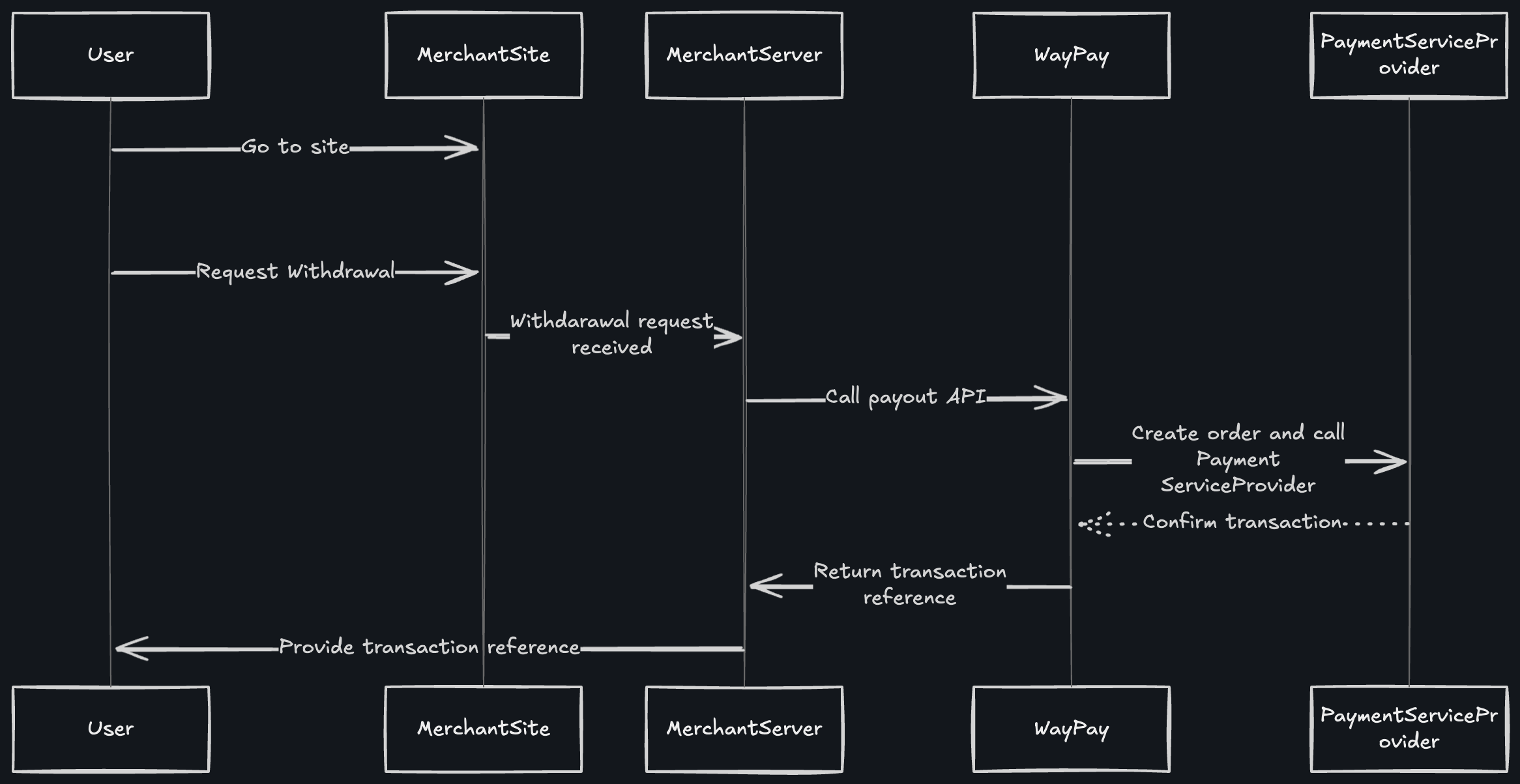
How It Works
Step 1: User Initiates Withdrawal Request
The customer visits your merchant site and requests a withdrawal (e.g., refund request, payout request, commission withdrawal).Step 2: Merchant Server Receives Request
Your merchant site captures the withdrawal request from the user and sends it to your backend server for processing.Step 3: Merchant Server Calls Payout API
Your backend server calls the Waypay/Payment/withdraw endpoint with:
- Withdrawal amount
- Customer’s bank account details (IBAN or account number)
- Customer’s bank name
- Customer’s full name and CNIC
- Withdrawal description and reference
Step 4: WayPay Creates Order and Calls Payment Service Provider
WayPay processes your withdrawal request and communicates with the Payment Service Provider (bank) to initiate the fund transfer.Step 5: Payment Service Provider Confirms Transaction
The Payment Service Provider:- Validates the bank account details
- Checks account holder name against CNIC
- Initiates the bank transfer
- Returns confirmation (indicated by dotted line showing async confirmation)
Step 6: Transaction Reference Returned
WayPay returns a transaction reference to your merchant server:Step 7: Merchant Provides Reference to User
Your site displays the transaction reference to the customer, allowing them to track the withdrawal status.Fee Structure
How Fees Work
When processing a withdrawal:- Withdrawal amount: Amount to send to customer (e.g., PKR 5,000)
- Transaction fee added: Based on your merchant rate (e.g., PKR 150)
- Deducted from balance: Amount plus fee (e.g., PKR 5,150)
- Customer receives: Full withdrawal amount (e.g., PKR 5,000)
Fee Breakdown
The transaction fee covers:- Bank transfer charges
- Platform processing fee
- Payment service provider costs
- Interbank transfer fees
Fee rates vary based on:
- Your merchant agreement
- Transaction volume
- Destination bank
- Transfer type (instant/standard)
Balance Check Before Withdrawal
Always ensure you have sufficient balance to cover both the withdrawal amount and the fee:Processing Modes
Auto Process Payout
WhenautoProcessPayout is set to true:
- ✅ Withdrawal is processed immediately
- ✅ No manual approval required
- ✅ Ideal for automated systems
- ✅ Best for trusted transactions
- ⚠️ Ensure sufficient balance including fees
Manual Approval
WhenautoProcessPayout is set to false (default):
- ⏳ Withdrawal requires manual approval
- 🔒 Additional security layer
- 👥 Suitable for high-value transactions
- 📊 Allows review before processing
Processing Time
Withdrawal processing times vary by bank and amount:The
estimatedCompletionTime field in the response provides the expected completion timestamp based on the specific transaction.Bank Account Validation
Supported Account Formats
- IBAN:
PK36SCBL0000001123456702 - Account Number:
0123456789012345
Validation Requirements
Account Holder Name
Account Holder Name
Must match the name associated with the bank account. Minor variations are acceptable (e.g., “Muhammad Ali” vs “M Ali”).
CNIC Verification
CNIC Verification
The CNIC provided must match the account holder’s CNIC registered with the bank.
Bank Name
Bank Name
Must be the exact name of the bank. Use standard bank names (e.g., “Habib Bank Limited”, “MCB Bank”, “Standard Chartered Bank”).
Account Status
Account Status
The destination bank account must be active and able to receive funds.
Best Practices
Verify Bank Details
Always verify bank account details before processing withdrawals to prevent failed transactions
Check Balance + Fees
Ensure sufficient balance for withdrawal amount PLUS transaction fees before initiating
Set Up Webhooks
Configure webhooks to receive real-time updates on withdrawal status changes
Store References
Save
paymentIntentId and transactionReference for reconciliation and supportReconciliation
When reconciling withdrawals, use the Transaction API to get detailed fee information:netAmount represents the total deducted from your balance (withdrawal amount + fee).
Error Handling
Common errors and solutions:Webhook Events
You’ll receive webhook notifications for these events:withdrawal.created- Withdrawal order createdwithdrawal.processing- Bank transfer initiatedwithdrawal.completed- Funds successfully transferred (includes fee details)withdrawal.failed- Transfer failed (with reason)withdrawal.cancelled- Withdrawal cancelled
Security Considerations
Compliance Requirements
For Pakistani banks, ensure:- ✅ Valid CNIC provided (13 digits without dashes)
- ✅ Account holder name matches CNIC records
- ✅ Bank account is registered in Pakistan
- ✅ Transaction purpose is documented
- ✅ AML/KYC requirements met for large transactions
Next Steps
Withdrawal API Reference
View complete API documentation
Webhook Setup
Configure webhook notifications
Balance Check
Query your wallet balance
Fee Structure
Understand transaction fees